Staff scheduling
Still building the schedule on paper or in a group chat? Build the week in a few drags, publish it, and everyone gets their shifts by email.
Free with every plan, from $14.99 a month. Team, a schedule link for each person, is $19.99 a month for up to 15 people.
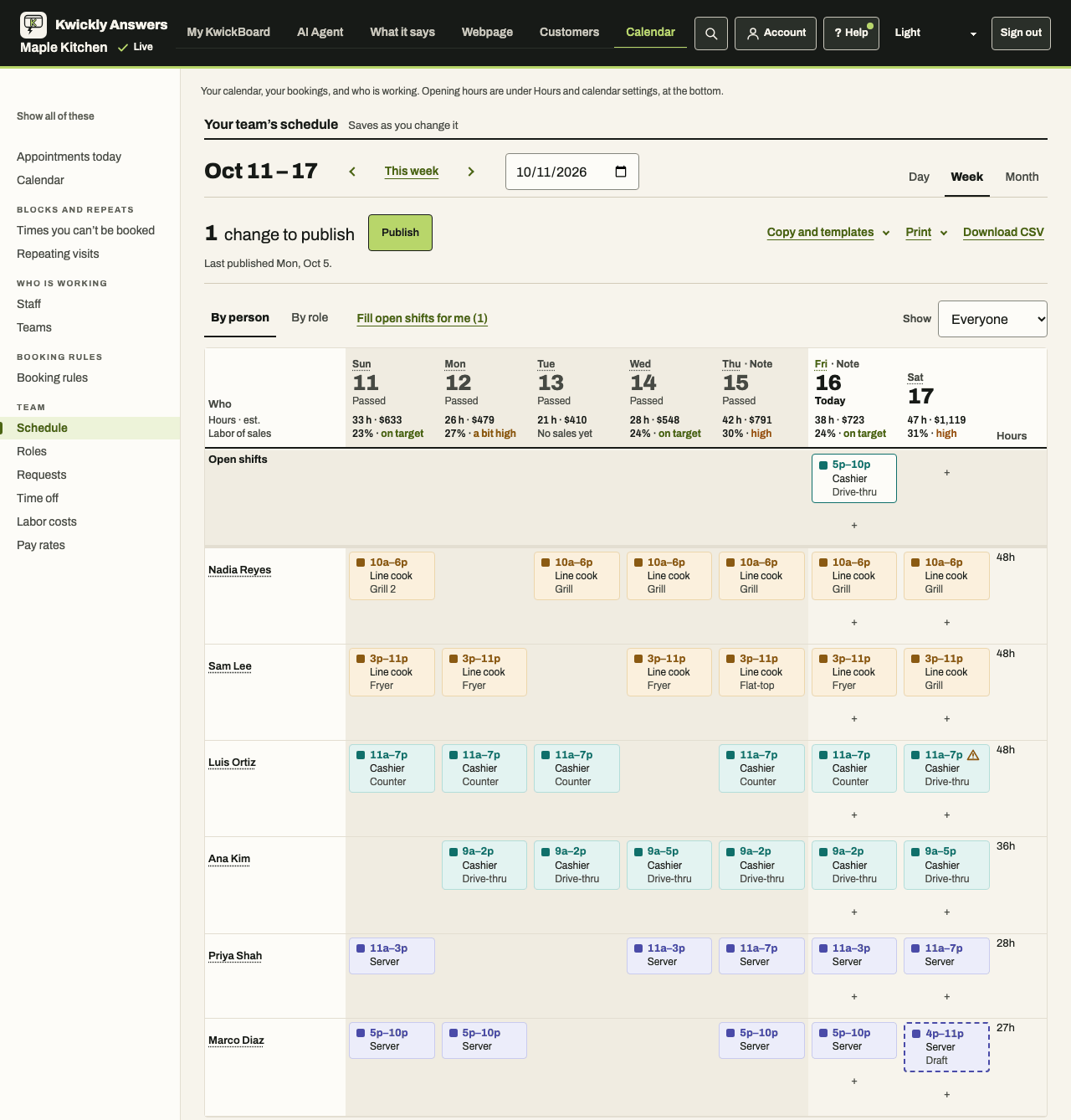
Free on every plan
- The week, by person or by role
- Drag shifts between days and people. Each shift has its role, times, unpaid break and a note. On a phone, it's a list by day.
- A day view and a month view
- See the day hour by hour, and the month at a glance. Shifts show on your calendar too.
- Roles and stations
- Your own job roles, who can work each one, and a base pay rate.
- Warnings, never blocks
- Two shifts at once, time off, over 40 hours in a week, and bookings outside someone's shifts.
- Copy, templates and fill
- Copy a day or a week, save a week as a template, or fill the week from each person's usual shifts. One Undo for the lot.
- Staffing targets
- Say how many people you want each day, and see how busy calls and orders were at each hour.
- Publish and email
- Publish the week and each person is emailed their shifts. Change it later and only the people whose week changed hear about it.
- Print, export and phone calendars
- Print the day, week or month, download it as a spreadsheet file, and give each person a link that adds their shifts to their phone's calendar.
- Time off
- Time off you enter blocks that person for bookings everywhere.
With Team
- A schedule link for each person
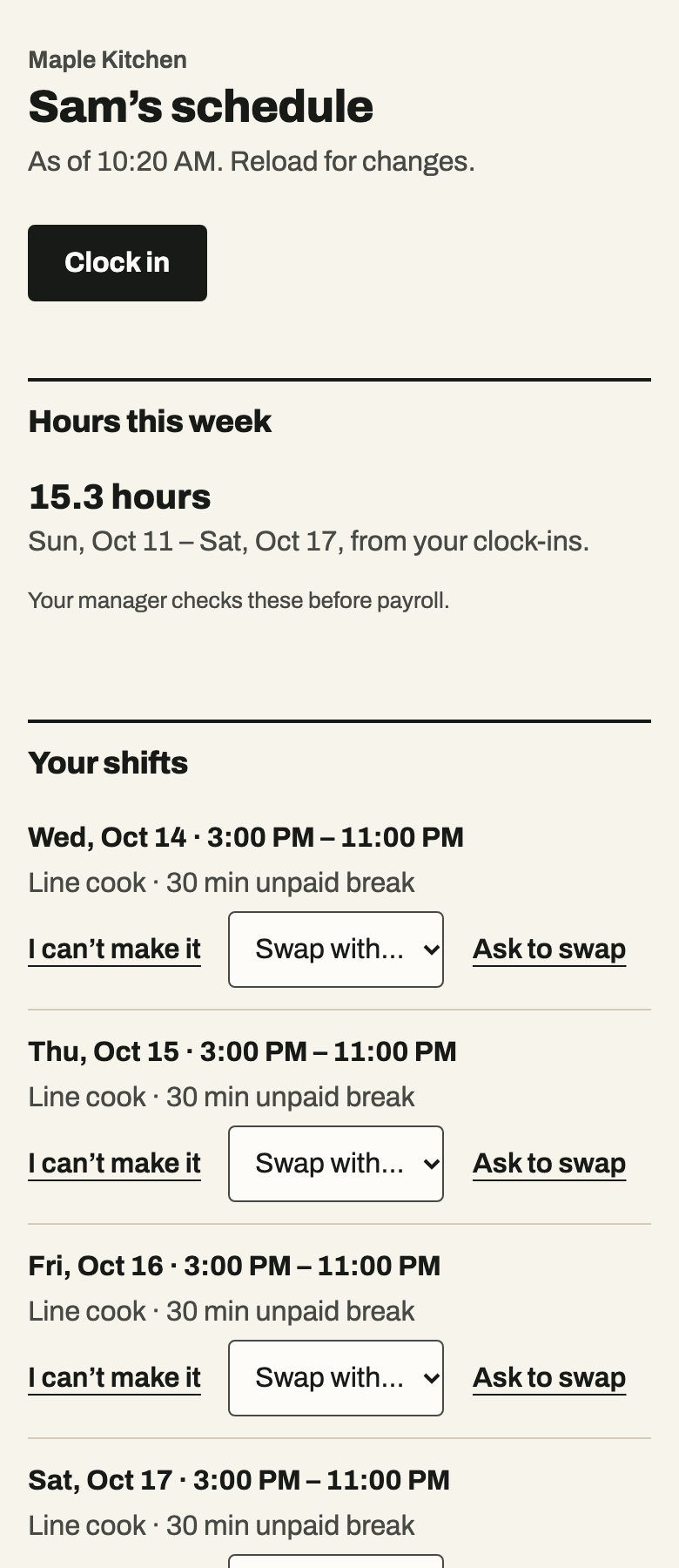
- Their shifts, open shifts and hours this week, on their own phone. No app to install.
- Time off requests
- They ask on their link. You say yes or no.
- Swaps and pick-ups
- They swap with a colleague or pick up an open shift. You approve it.
- When they can work
- Each person says when they can and can't work. You see it as a warning while you build.
- Clock in and out
- They tap in and out on their link. You can fix a punch, with a reason, and the first version is kept.
- Timesheets and labor cost
- Scheduled against actual hours, overtime, an estimated labor cost for each day from the pay rates you enter, and labor % once you add sales.
See it
What it doesn't do yet
- No staff logins or app. Each person uses their own private link.
- No push notifications. Schedule texts to staff are built but not yet switched on.
- No break or meal tracking, and no clock-in kiosk or location check.
What it costs
Building, publishing and printing the schedule is free on every plan. The cheapest plan is Online booking at $14.99 a month.
Team is $19.99 a month for up to 15 people, or $39.99 for 16 or more, and it adds to any plan. Online booking plus Team is $34.98 a month.
How it connects
- Online booking
- Time off blocks bookings. With Team and the setting switched on, a published shift sets when that person can be booked that day. The setting starts off.
- AI receptionist
- Callers get the same open times as your booking page, so time off is respected.
- How to make your team's schedule
- Step by step, in the help pages.
Questions
Is scheduling really free?
Yes. Building, publishing, printing and the phone calendar links are free on every plan. Team adds each person's own schedule link.
Do my staff need to download anything?
No. Each person opens their own link in their phone's browser.
Can I buy Team with Online booking?
Yes. Team adds to any plan. Online booking plus Team is $34.98 a month.